

DataBadger has recently introduced the BadgerStripe application. BadgerStripe allows DataBadger devices to be updated with new device firmware via a local area network. This update gives an overview of why users might want to update firmware, an overview of the application, and how our devices are updated.
DataBadger devices are microcontroller based electronic units which are able to connect to the network in an office, factory, laboratory, or warehouse using either Wi-fi (wireless) or Ethernet (cable). Each device has it’s own particular task, whether that’s measuring temperature, controlling digital outputs, or reading 4-20 mA loops. The task of any device is carried out through a combination of the device hardware and it’s firmware. Firmware is the code that lives on the microcontroller and is programmed (or burned) into the microcontroller during manufacture at DataBadger.
Obviously, once hardware is built it can’t be changed. Firmware is different however. Firmware can be updated after the device has been released, just like how your mobile phone sometimes requests a software update. The firmware can be updated without needing to change any hardware.
Why update my device?
DataBadger devices ship ready to use. However, there a times when users might want to update the device firmware, such as;
- We are continuously improving our systems and devices. As we develop new software and features, new firmware might be required to make use of these developments. Updating the device firmware avoids buying new hardware and means users continue to get the best from their hardware.
- DataBadger works with clients to develop bespoke data acquisition and control systems for their applications. While systems are under test, we can now send new firmware out to these users. This makes the development of bespoke systems much faster and easier without shipping the device, or using programmers.
Using BadgerStripe
We design all of our devices to be simple to use as a priority. Updating firmware should be no different. Therefore, the BadgerStripe application provides a user interface which is very similar to BadgerView, our data logging application. However, instead of viewing the available data channels and device settings, BadgerStripe shows only the device name, model, and firmware version installed.
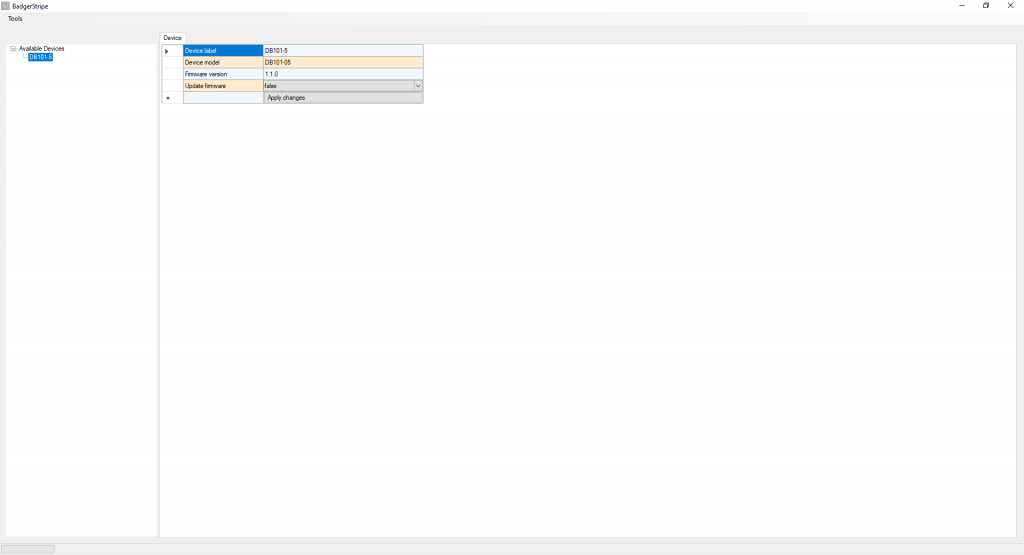
Updating the device firmware is done by requesting an update via the drop-down box and clicking apply. BadgerStripe will ask for a DataBadger hex file (.DBH) and will then start the update process. DBH files are typically released on a per customer basis when required. BadgerStripe checks the integrity of the file prior to uploading it to the device, where it is checked again before it is written to device memory. Finally, the device reboots back into application mode and carries on it’s normal job. The whole process typically takes less than 3 minutes.
How does this work?
Updating firmware in this way uses a process called bootloading. Normally a microcontroller has only one job, which it starts doing immediately when it is powered on, and doesn’t stop until power is removed. This involves running a program (or firmware) loaded into device memory.
In the image below we can see a memory organisation chart for a DataBadger device, which you can imagine like the page of a book. On power up, the device starts reading at the top left and follows the instructions given to configure the device (light blue). Next the application starts (dark blue). This application is the section of memory where the device spends most of it’s life, and users interact with the device using BadgerView. Although like a page in a book, the instructions in application memory tell the device to hop around within the application, so the device never actually reads past the end of the application area.
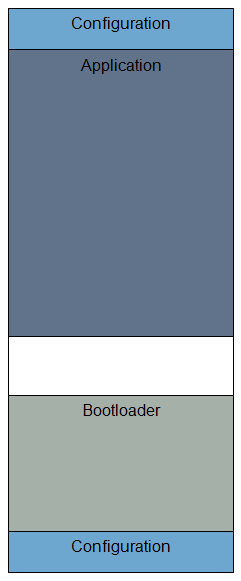
However, say we want to change who to device behaves; we can’t overwrite the application memory section while the device is working in this area. In order to do this, we need a second, smaller application called a bootloader (Light grey). The DataBadger bootloader is a slimmed down area of code which only knows how to connect to a network and write instructions to application memory. Using a special instruction, BadgerStripe can tell a DataBadger device to hop past the end of application memory and into the bootloader.
Once running the bootloader, the device can receive commands to update the application memory with new instructions, checking each one is correct as it goes. Once this process is complete, the device reboots back into the application memory, making use of the new application firmware and the new features contained within. This ability to update the device without removing it from the operating environment is fundamental to proper remote data logging and distributed control system development as devices can often be in hard to reach places. This makes BadgerStripe a powerful tool for those looking to enhance and support their automation systems.
We hope you enjoyed this overview of the latest development from DataBadger. You can follow us on instagram and Linkedin or sign up for our mailing list to keep up to date with our quest for better data. There’s much more to come.